General settings
Core identity for a site: tracking snippet, canonical URL, timezone. Find them at Site settings → General.
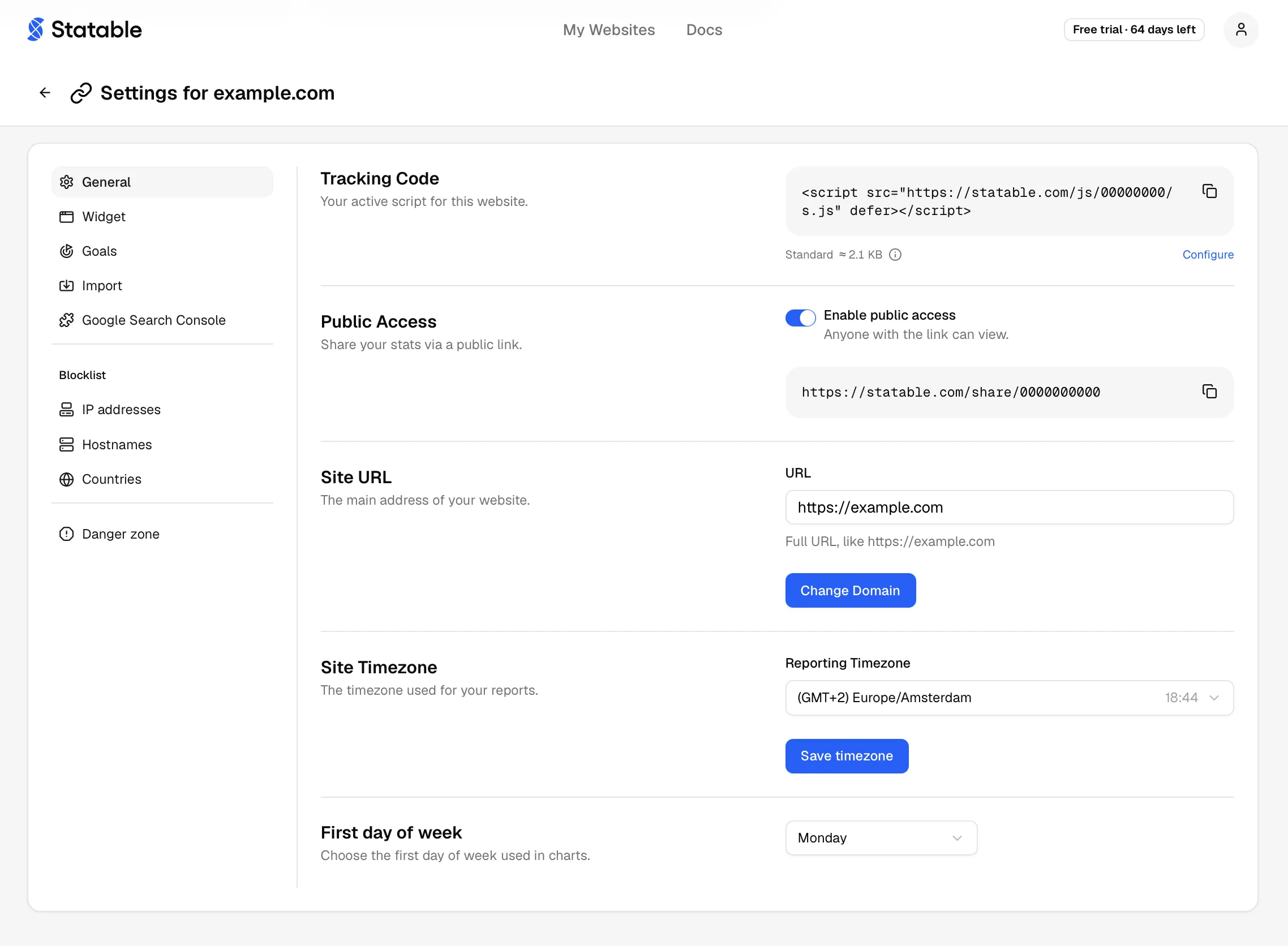
Tracking code
Each site has a unique numeric ID baked into the script URL (/js/<id>/s.js). The snippet is generated once and never changes.
Drop it into <head> on every page you want to measure. About 2.4 KB over the wire, loads async, exposes window.statable.t() for manual events.
To copy:
- Open Site settings → General.
- Find the Tracking Code card.
- Click Copy.
The data-id cannot be regenerated. Need a new ID? Create a new site.
The card also carries the script's feature selection: Standard, Nano or Custom. See Tracking features for what each feature measures and what it weighs.
Site URL
The canonical domain Statable associates with the site. Used as the default link target in dashboards, in shared screenshots, and during installation checks.
Rules:
- Must start with
http://orhttps://. HTTPS is recommended for production sites. - No trailing slash. Statable strips it on save.
- One hostname per site. For multi-domain setups, use the hostname allowlist.
To change it:
- Click Change Domain on the Site URL card.
- Enter the new URL (e.g.
https://app.example.com). - Confirm. The change applies immediately.
The new URL meets the same rules as a new site. A domain in a zone we don't serve is refused, and a Free Access site can only move to another .edu, .github.io or .gitlab.io address.
The data-id stays the same. Only the canonical URL is rewritten. Verify the snippet is still installed on the new domain.
Timezone
Events are stored in UTC and converted to your site's timezone for display. One IANA zone per site (Europe/Kyiv, America/Los_Angeles, Asia/Tokyo, etc.).
Pick the timezone where your team analyzes data, not where servers run. It affects:
- Hourly and daily buckets in the chart.
- "Today" / "Yesterday" presets.
- Goal and event aggregation windows.
- CSV exports.
Switching after data has accumulated re-buckets historical reports. A "9 AM peak" in America/New_York shifts to "6 AM" if you switch to America/Los_Angeles. Underlying events aren't modified, only the rendering.
Click Save timezone. Takes effect on the next dashboard refresh.
Week start
Weekly charts group visits into week buckets. Choose the day each week begins on: any of the seven, with Monday as the default.

Open Site settings → General and find First Day of Week, below Site Timezone. Pick a day from the dropdown. The choice saves as soon as you make it, with no separate button.
It sets the weekly buckets on charts and the first column of the calendar in Custom Range and in the GA4 import date picker. Daily, monthly and quarterly views are unchanged. On a public dashboard the calendar always starts on Monday. Weeks re-group the next time reports redraw, and stored events are never rewritten, so you can change the day as often as you like.
Edit widget settings
If you've embedded a public widget (Map, Globe, Top Countries, Live Users), its visual options live behind Edit widget settings. Jump to the configurator without leaving the site context.
What General doesn't control
- Public dashboard URL lives under Public dashboard.
- IP and hostname blocklists live under Blocklist settings.
- Historical GA4 data is imported as part of migrating from GA4.
- Site deletion lives under Delete a site (Danger zone).
- Billing and plan are per-account, not per-site.
Ready to take control of your web analytics? Try Statable free for 30 days. No credit card required, full feature access, built for GDPR. Start your free trial or view a live demo.