
Free Browser Extension
GDPR Checker: See What A Website Loads Before Consent
The Statable GDPR Checker checks one thing: consent. It watches a page load and shows which trackers, cookies and embeds fired before the cookie banner was answered, and why each one counts.



Free • No account • Chrome 116+, Edge 116+, Firefox 140+
A Defined Pre-Consent Window
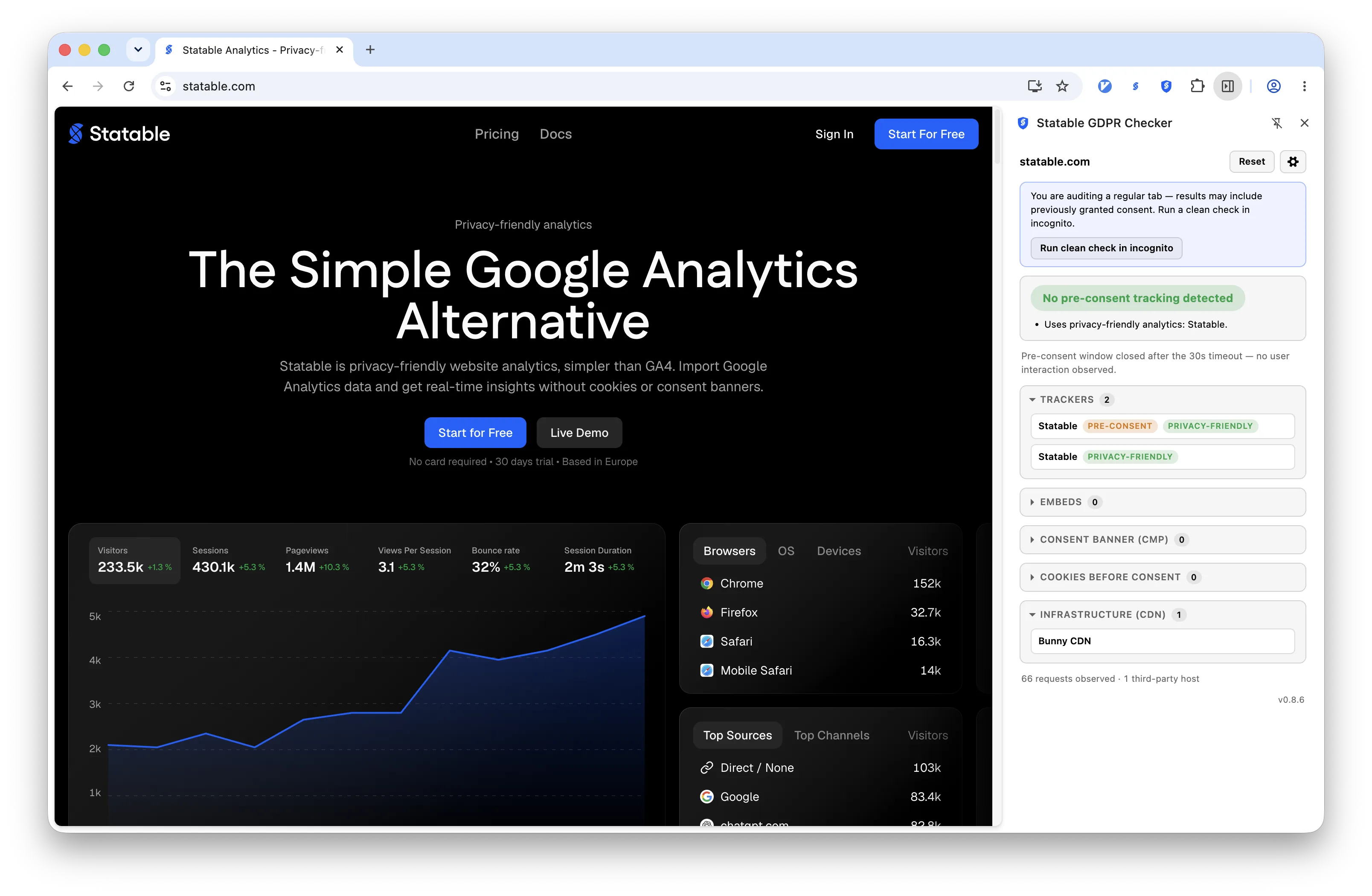
The window opens when the page starts navigating and closes at the first click, key press or touch, or after 30 seconds. Everything the verdict rests on was observed inside it.
Nothing Leaves Your Browser
The extension makes no network requests of its own and stores nothing. No account, no history, no extension storage. Close the tab and the measurement is gone.
Readable Signatures
Detections come from a hand-curated signature file kept as plain YAML in the extension's source. You can read which host, cookie or script pattern produced a finding, and disagree with it.
What It Checks
It works as a GDPR cookie checker and more. Everything below is measured inside the pre-consent window, before the cookie banner is answered:
- Trackers before consent. Analytics and advertising tags that send visitor data before anyone agrees, each named by vendor, request and moment.
- Cookies set in advance. Cookies stored before the banner is answered, with their attributes: persistence and SameSite are the difference between a load balancer's session cookie and a cross-site identifier.
- Embeds that share the IP address. Remote fonts, reCAPTCHA, review widgets and other embeds that hand the visitor's IP address and page URL to a third party.
- Tags that wait. A tracker that holds back until the visitor agrees is working correctly and is reported as such.
- Pages it could not measure. These are reported as not measured, never as clean.
How It Reads
Open The Panel, Reload The Page, Read The Result
The cookie consent checker opens in the side panel on Chrome and Edge, and in the sidebar on Firefox. Let the page settle without clicking, and the verdict appears with its reasons listed beneath it.
Read The Verdict And Every Reason Behind It
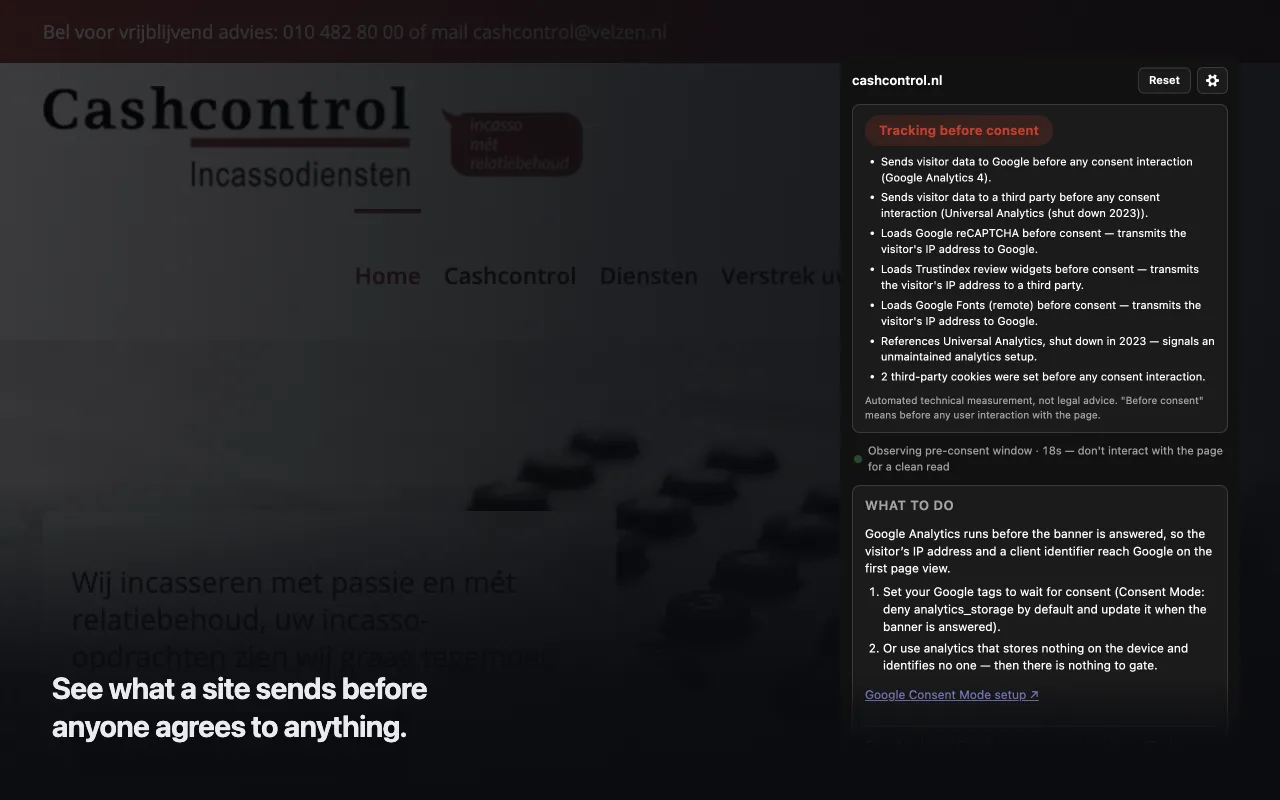
On a red result the panel lists what fired inside the window. Here: Google Analytics 4 and Universal Analytics sending visitor data before any interaction, reCAPTCHA, a review widget and remote Google Fonts handing the visitor's IP address to a third party, and two third-party cookies set in advance. The disclaimer sits right beside it: automated technical measurement, not legal advice.
What To Do In Each Case
Below the verdict, a What To Do section explains each finding in plain words and lists the steps. For Google Analytics: set your tags to wait for consent with Consent Mode, or use analytics that stores nothing on the device. For remote fonts: download the files and serve them from your own domain. A link points to Google's Consent Mode setup guide.
Type A Domain When The Tab Cannot Be Measured
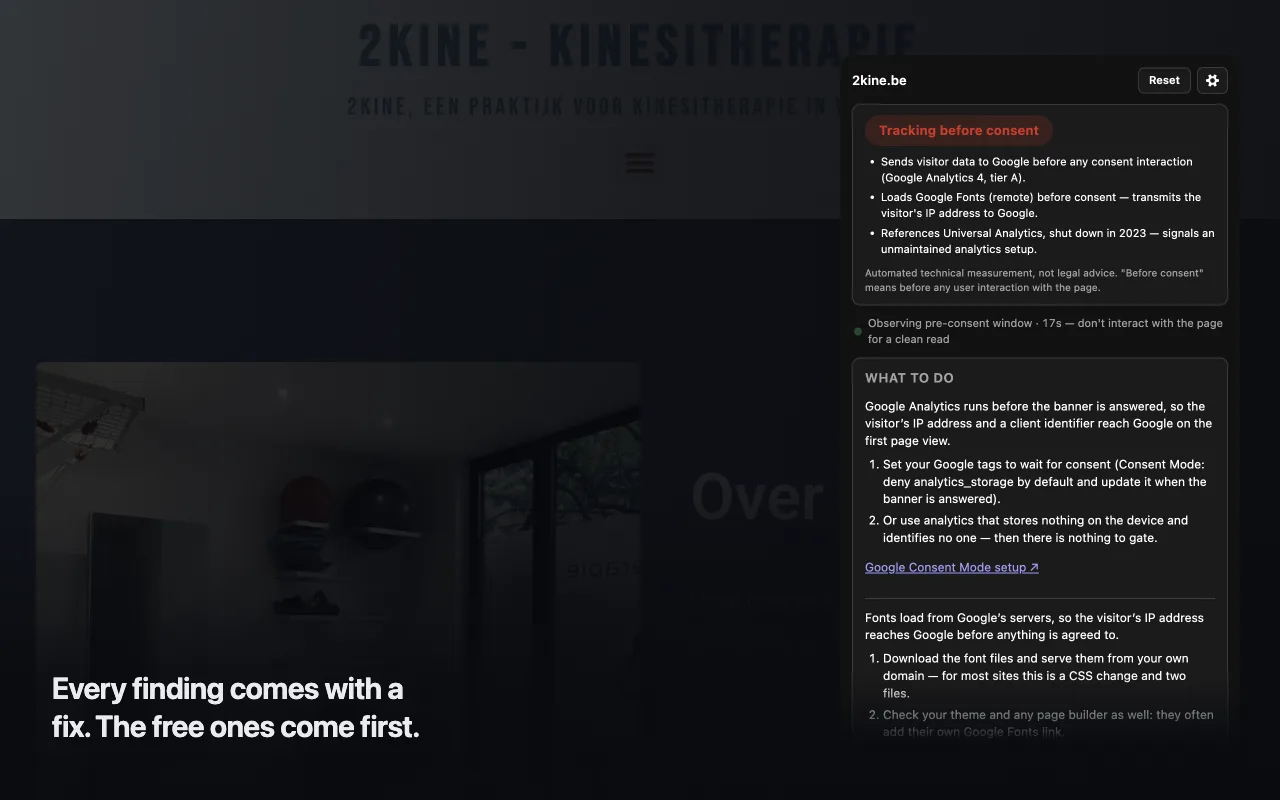
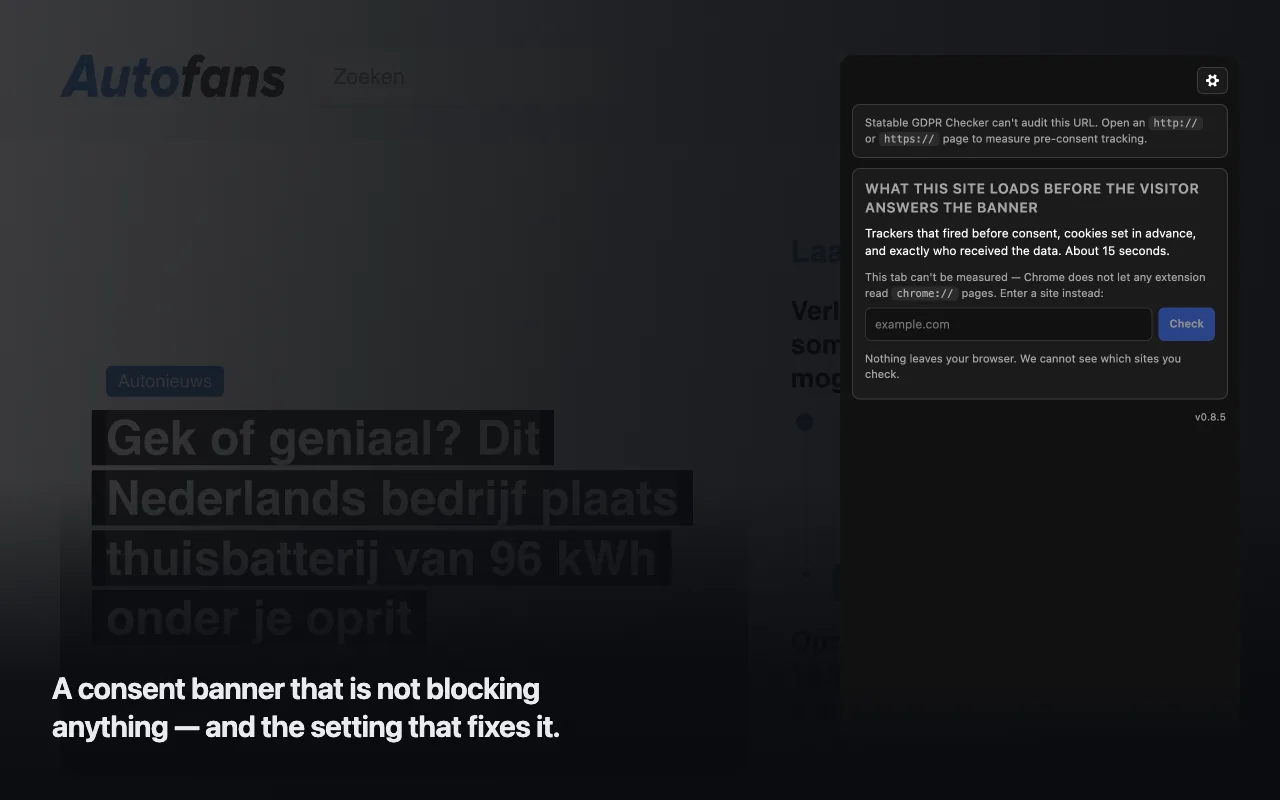
Browser pages such as chrome:// cannot be measured, because no extension is allowed to read them. Instead of a dead end, the panel offers a field: enter a site and the checker opens it in a new tab and measures that load. Nothing leaves your browser, and we cannot see which sites you check.
About And Settings, With The Ruleset Version
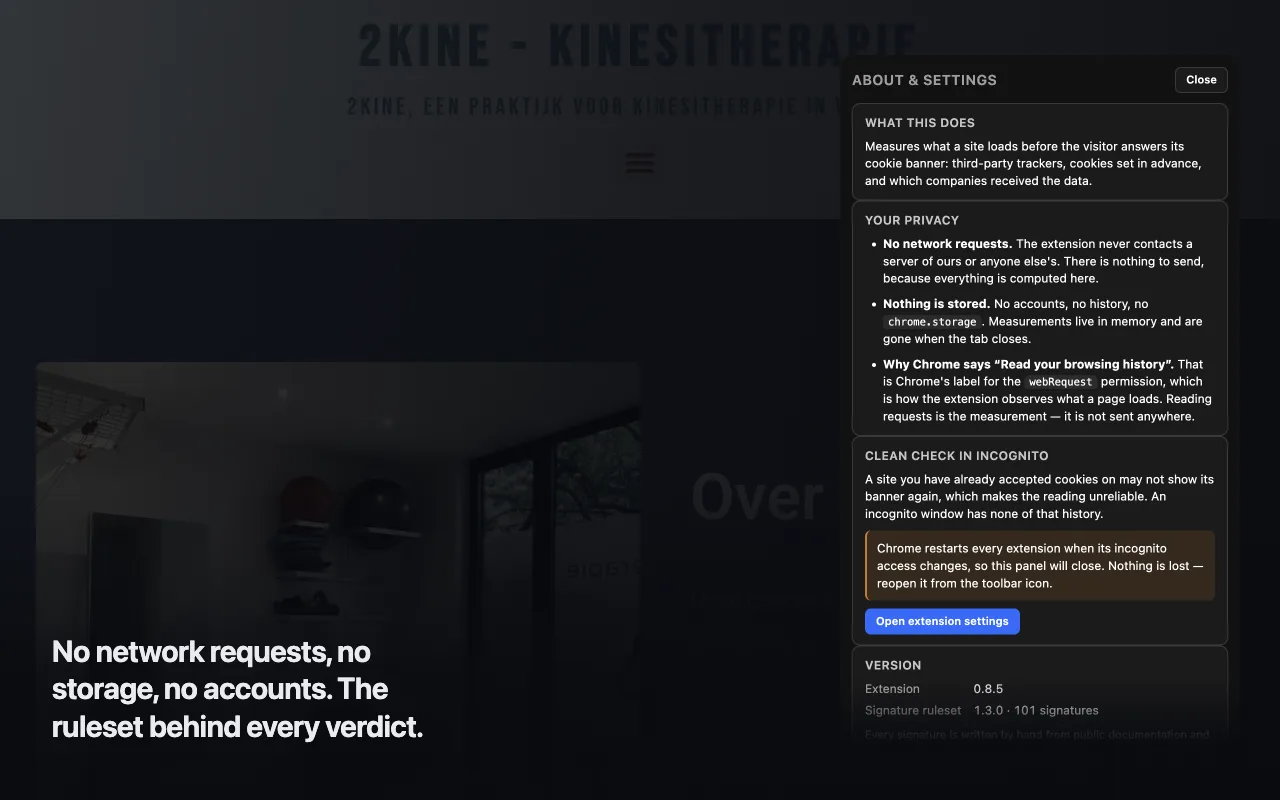
The settings view repeats what the tool does and what it does not: no network requests, nothing stored, and why Chrome labels the webRequest permission as reading your browsing history. It explains the clean GDPR check in incognito, opens the browser's extension settings for you, and shows the version of the extension and of the signature ruleset behind every verdict.
Honest Limits
What The Checker Does And Does Not Do
It Checks Consent, Not All Of GDPR
A full GDPR compliance check covers far more than cookie banners: the right to see, correct and delete data, data portability, contracts with processors. The cookie consent checker answers one question only: did the site wait for the visitor's consent before talking to third parties? The consent rule for cookies comes from the ePrivacy Directive, which covers storing or reading anything on the visitor's device; sending the visitor's IP address to a third party is a GDPR question. Whether the rest of your setup is lawful depends on things it cannot see, and nothing it shows is legal advice.
Green Is Not A Certificate
A green result means nothing in the tracked categories was observed in that window on that page. A different page, or the same page after a deploy, can differ.
One Page, One Load
It audits the tab in front of you and does not crawl a site or produce a report across pages. A verdict describes a single load: dynamic tags, consent platforms that behave differently by region and A/B tests all mean the next load can differ from this one.
Some Pages Cannot Be Measured
On chrome:// and about: addresses the panel says so, because no extension is allowed to read them. And if you click somewhere while the page is still loading, you close the pre-consent window early and the GDPR check covers less than it should.
From The Statable Team
Built By The People Behind Statable
Statable is privacy-first web analytics: no cookies, nothing stored on the visitor's device, and usually no analytics consent banner to add. This cookie consent checker follows the same principle. It makes no network requests of its own, and every claim about it is checkable in its source.
FAQ
Frequently Asked Questions
Is the GDPR Checker free?
Yes. The extension is free on the Chrome Web Store, Edge Add-ons and Firefox Add-ons. There is no account to create, no sign-up and no paid tier. Install it, pin it and open the panel on any page. The WCAG Checker extension is free on the same terms.
Does it send data anywhere?
No. The extension makes no network requests of its own, so nothing it observes leaves your device: not to Statable, not to a third party, not for analytics or error reporting. The signature list that names trackers ships inside the package.
Nothing is stored either. There is no account, no history and no extension storage. A measurement lives in memory for as long as its tab does and is gone when the tab closes. The Firefox build declares no data collection to Mozilla for the same reason. The full statement is in the extension privacy policy.
Which browsers does it support?
Chrome 116 or newer, Edge 116 or newer and Firefox 140 or newer. Other Chromium browsers can use the GDPR Checker Chrome extension. On Chrome and Edge the checker opens in the side panel; on Firefox it opens in the sidebar.
How is it different from a cookie scanner?
A GDPR website scanner, cookie scanner or GDPR compliance checker typically crawls a site and lists the cookies it finds. The GDPR Checker watches one page load live in your own browser, inside a defined pre-consent window: from the start of navigation until your first click, key press or touch, or 30 seconds. Within that window it reports the network requests, the cookies stored and the companies that received the visitor's IP address and page URL, and lists the reason behind each finding.
Detections come from a hand-curated signature file kept as readable YAML in the extension's source, so you can see exactly which host, cookie or script pattern produced a finding. The docs describe the reasoning behind each verdict.
Does a green result mean the site is GDPR compliant?
No. Green means nothing in the tracked categories was observed in that window on that page. It is a technical measurement, not a legal verdict and not legal advice. Whether what a page loads is lawful depends on your lawful basis, your jurisdiction and your consent design, which the extension cannot see.
A different page, or the same page after a deploy, can produce a different result. Dynamic tags, consent platforms that behave differently by region and A/B tests all mean the next load can differ from this one.
Where do I report a wrong verdict or a bug?
Email support@statable.com with the page URL and, if you can, a screenshot of the panel. If you think a signature is wrong, say which finding you disagree with; the signature file is readable, so the pattern behind it can be checked and corrected.
Install
Add The GDPR Checker To Your Browser
Free, no account. Chrome 116+, Edge 116+, Firefox 140+. Once installed, pin the extension and click its icon to open the panel.