Delete your account
Permanent. Removes every site you own, every event ever collected, every shared link, and your subscription. No undo, no soft-delete, no grace bin. If you're not sure, delete a single site instead and keep the account around.
What gets removed
When you confirm, Statable runs a server-side cascade that wipes:
- All sites you own. Every site record, plus all per-site settings (timezone, blocklists, public dashboard tokens, hostname allowlists).
- All collected data. Pageviews, sessions, custom events, goals, properties, referrers, device data, geolocation samples. Across every site.
- Imports. Historical GA4 imports and any in-flight import jobs.
- Widgets. Embedded live counter, globe, and map configurations stop working immediately. Anyone with the embed code on their site sees the widget fail to load.
- OAuth tokens. Google and GitHub OAuth bindings are unlinked. To sign in to Statable with the same Google or GitHub account again, you'd start over with a new account.
- Refresh tokens. Every active session across every browser is revoked instantly.
- Login logs. Your audit trail is purged.
- Your email in our records. Pending invitations to your address, sign-in codes, sent-email logs, support reports you filed and your API key history are removed too.
- Stripe subscription. If you have an active paid plan, Statable cancels it via the Stripe API as part of the delete flow. No refund for the unused portion of the current period, and no further charges.
Active subscription warning
If you have an active paid subscription, the delete dialog warns you before proceeding. Two options:
- Cancel the subscription first through the Stripe Billing Portal, let it run to the end of its period, then delete the account on a fresh free state.
- Confirm anyway. Statable cancels the Stripe subscription as part of deletion. No refund for the partial period, but no further charges.
Pick the first if you want to keep the account live until the end of the billing period you already paid for. Pick the second if you want it gone now.
How to delete
- Open Settings → Preferences.
- Scroll to the Delete account section at the bottom.
- Click Delete.
- In the dialog, choose a reason:
- I have another account. Most common, helpful signal for us.
- Other. A free-text field appears.
- Type
delete my accountinto the verification field, all lowercase. Deliberate friction to prevent accidents, and a different phrase from the one that deletes a single site. - Click Delete account permanently.
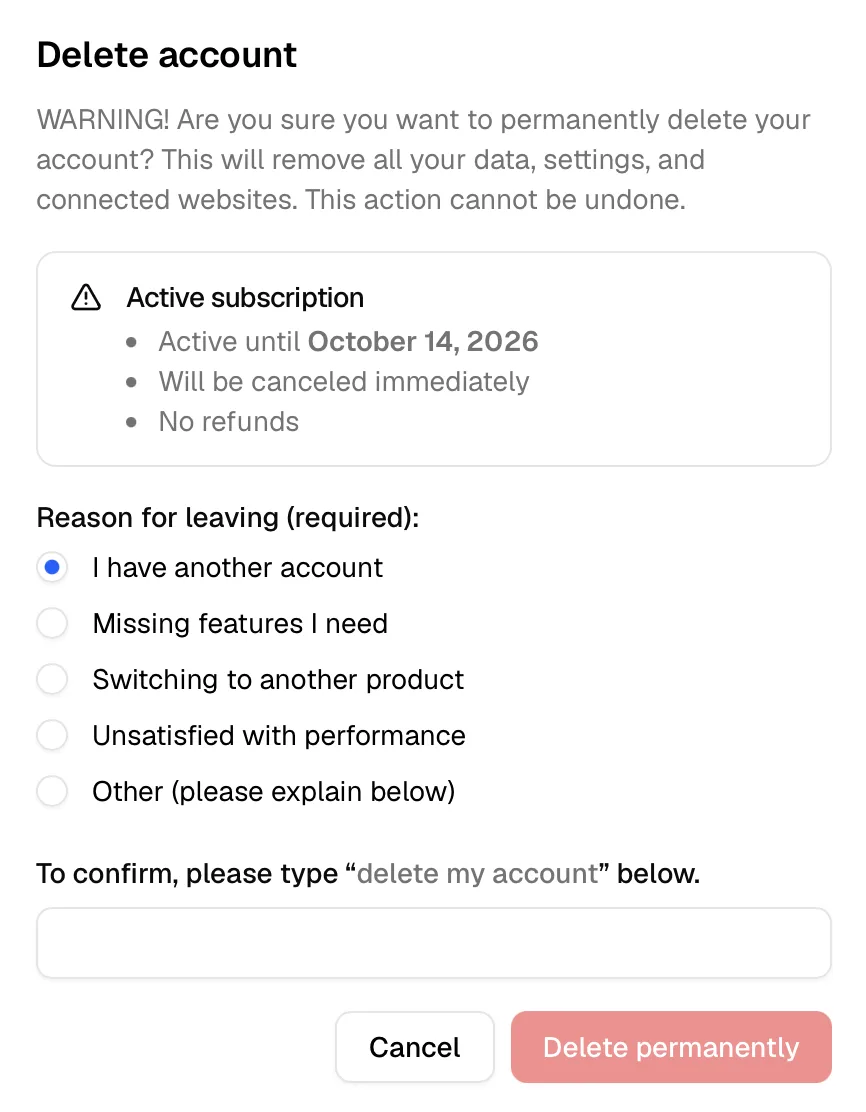
The cascade runs server-side immediately. You'll land on an Account deleted page and your session is invalidated. Closing the tab or hitting back doesn't undo anything. The data leaves our working systems at once and expires from encrypted backup copies within 14 days.
After deletion
- Sign-in. Signing in with the deleted email starts a brand new account, and its first website starts a new 30-day Free Trial. The old data does not return.
- Email. No further marketing or transactional email from Statable, except a single confirmation that the deletion succeeded.
- Stripe. If a subscription was cancelled, you'll receive a final receipt from Stripe showing the cancellation. No further charges.
- Embed widgets. Any widget you had embedded on external sites returns 404 immediately. Remove the embed snippets at your convenience, they won't break the host page, just show nothing.
Alternatives to deleting
If your goal is to stop tracking one site but keep using Statable, delete just that site from Site settings → Danger zone → Delete site. Frees pageview headroom on your plan without touching the rest.
If your goal is to pause billing but keep your data, cancel the subscription through the Stripe Customer Portal (Settings → Plan & Billing → Manage). The current period continues to the date you've already paid through. After it ends, your sites stop recording new visits and the dashboard shows Tracking has stopped instead of charts. No data is deleted, so resubscribing later restores full access to everything collected before.
If your goal is to leave a team site, remove yourself from the shared access list rather than deleting the whole account.
Ready to take control of your web analytics? Try Statable free for 30 days. No credit card required, full feature access, built for GDPR. Start your free trial or view a live demo.