How an agent set up our goals before the coffee went cold
On August 7 somebody signed up on statable.com. Nice. Then the small problem: we had never created any goals, so the dashboard could tell us a signup happened and absolutely nothing about where it came from. A link someone posted? Search? No idea.
We know how this sounds. We make analytics software and hadn't set up our own goals. Small team, nobody whose actual job is marketing, everyone busy shipping. "Set up the goals" sat on the list behind more urgent things.
If you've ever launched something and realised a week later that the goals were never set up, you know the feeling that comes next. The data's gone. Wait for it to happen again.
It isn't gone. We'd already shipped an MCP server. So we pointed Claude at it, asked for goals, and had them two minutes later. Easy peasy.
Nothing was lost, and here's why
Your site fires a custom event, we store it. That happens whether or not a goal exists.
A goal doesn't collect anything. It's a saved condition, and it gets applied to events already sitting in storage at the moment you ask a question. So a goal you create today can answer questions about last month. There's no cutoff at the moment you hit Save.
Which means forgetting to create a goal costs you nothing but the time until you notice. Forgetting to send the event is the expensive one.
The one thing you do have to do in advance
Fire the event. window.statable.t('Sign up via Google') in your signup handler, and that's it, nothing to configure on our side. Goals can come later. Events can't be invented later.
Make an agent your assistant
Agents have got good enough to take this kind of work off your hands. Looking up what fired, checking it against last month, deciding what counts as a conversion: all of it is questions with answers already sitting in a database. What they need from you is access, and that's one key.
Create a key under Settings → API with two permissions: Read analytics, to find your events, and Manage sites, to save the goals it comes up with.
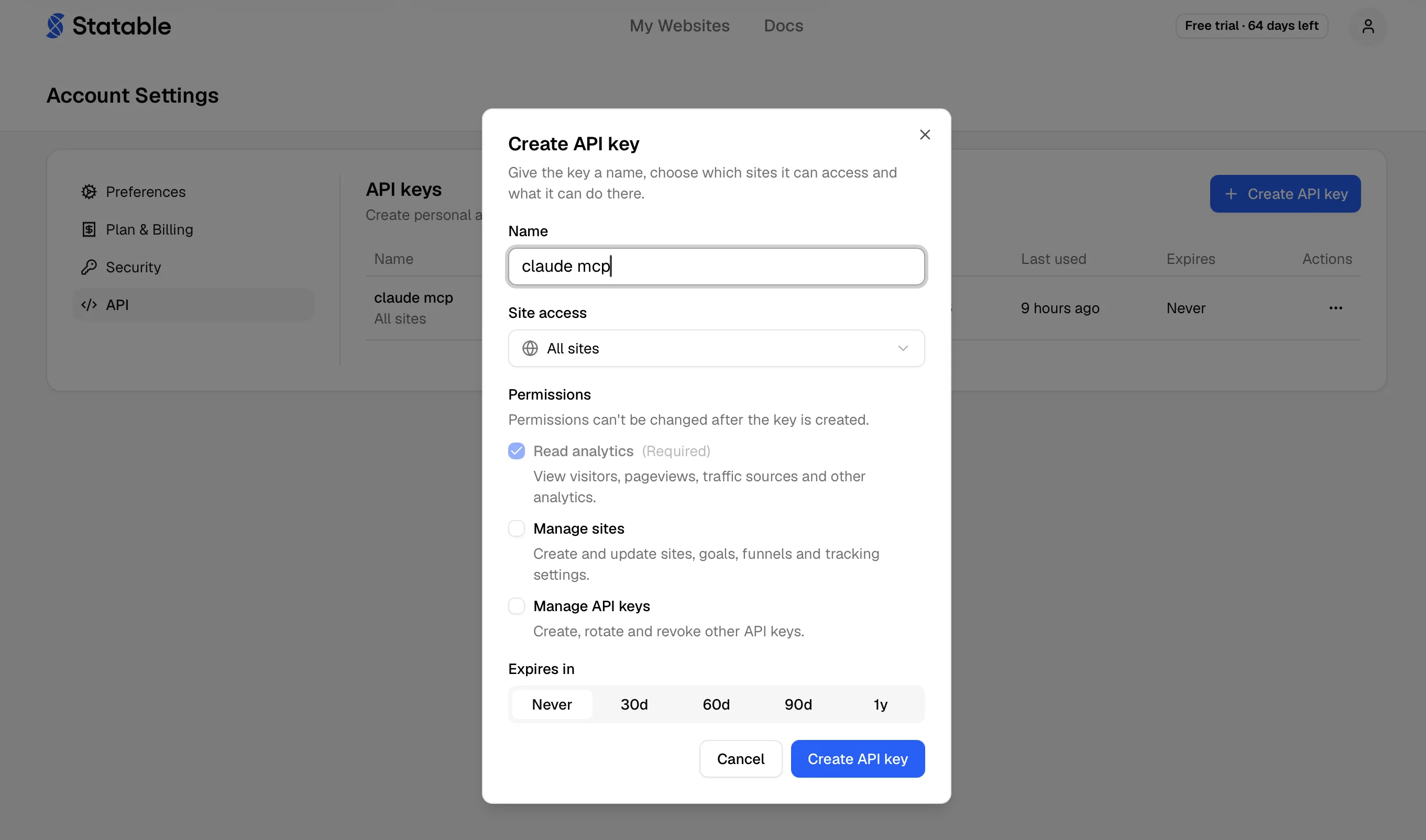
Then point your agent at us. We asked Claude Code to wire it up, and it came back with one line:
claude mcp add --transport http statable https://mcp.statable.com/mcp \
  --header "Authorization: Bearer stbl_XXX"
Swap stbl_XXX for the key you just made, and keep it out of anything you commit.
That line is Claude Code's own. Codex, Cursor and anything else that speaks MCP each want it their own way, so do what we did and ask: tell your agent you want to connect the Statable MCP server at https://mcp.statable.com/mcp, and it will hand you the right one.
Now just ask
The first question is the one you'd ask a colleague.
Someone signed up on statable.com on August 7. Which custom events fired that day?
Thirteen kinds came back. One of them:
Sign up via Google: 1 event, 1 visitor
Recorded on August 7, hours before anyone thought about goals. Nothing had to be switched on for it to exist.
Then the obvious follow-up.
Where did that visit come from?
Everything it could tell about that one visit:
| Source | |
| Channel | Organic Search |
| Referrer | https://www.google.com/ |
| Landing page | / |
| Country | US |
Someone in the United States searched, landed on the homepage, signed up. That tells you where the next hour of effort should go. "A signup happened" tells you nothing.
And every bit of it is about a visit from before any of this was set up.
One sentence, three goals
Create a goal for each signup event on this site.
The agent already knows the event names from the first question, so it makes one goal per signup path without being told what they are. This is the step that uses Manage sites, and the one it does with a direct API call rather than through MCP.
Your agent can't break anything through MCP
That split is deliberate. Every Statable MCP tool is read-only, and that's a property of the server rather than a gap in it: one permission gate covers the whole tool surface, and each tool ships with a read-only annotation. Whatever key you hand it, an agent connected over MCP can look at your analytics and do nothing else.
Writing goes the other way, through a plain HTTP request to the Stats API. Coding agents work that out without being taught.
Goals aren't only for events, by the way. A confirmation page works just as well, and so does scroll depth. If you'd rather describe the outcome than name an event, just say so:
Also add a goal for anyone who reaches
/thanks.
The part that feels like cheating
Show me conversions for the last 30 days.
The goals were seconds old. The answer covered a month.
| Goal | Uniques | Total | CR |
|---|---|---|---|
| Sign up via Google | 6 | 6 | 0.8% |
| Sign up completed | 2 | 2 | 0.3% |
| Sign up via email | 2 | 4 | 0.3% |
Six signups through Google across the month. The first question had asked about a single day and found one. No new traffic, no waiting, nothing reprocessed. The same three rows turn up in the dashboard under Goals, and from here they keep themselves current.
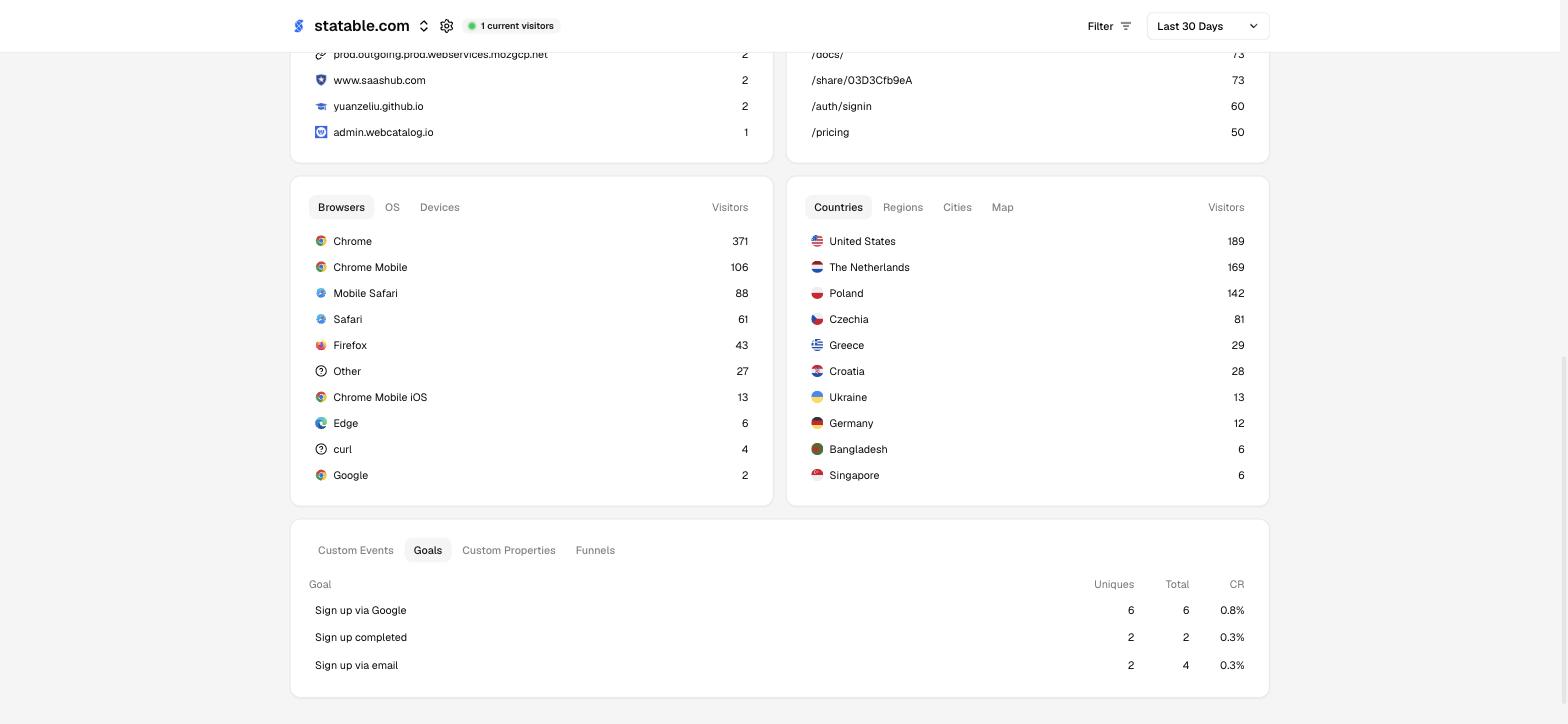
None of it spent clicking around in analytics. The alternative was waiting until September to find out the same thing.
A few things worth knowing
- Editing a goal rewrites what it reports. The condition runs when the report runs, so changing it changes the history you see. If two definitions measure different things, ask for a second goal instead of editing the first.
- Deleting a goal removes the condition, not the events. Ask for the same goal again and the numbers come straight back.
- If your agent gets stuck, it's usually the site: a key covering several sites wants the numeric site id rather than the domain. Tell it which site you mean and it's fine.
What to do today
Fire an event for every outcome you care about, including the ones you have no plans to report on. Measurement starts when the event exists, not when you get round to the reporting.
Then go and look at what your site has already been sending. If it has been firing events, there is history sitting there that nobody has asked a question about yet.
- Custom events: how to fire one
- Goals: the three goal types and the dashboard route
- AI assistants: full MCP setup and the available tools
- Stats API: the endpoints your agent uses
Ready to take control of your web analytics? Try Statable free for 30 days. No credit card required, full feature access, built for GDPR. Start your free trial or view a live demo.